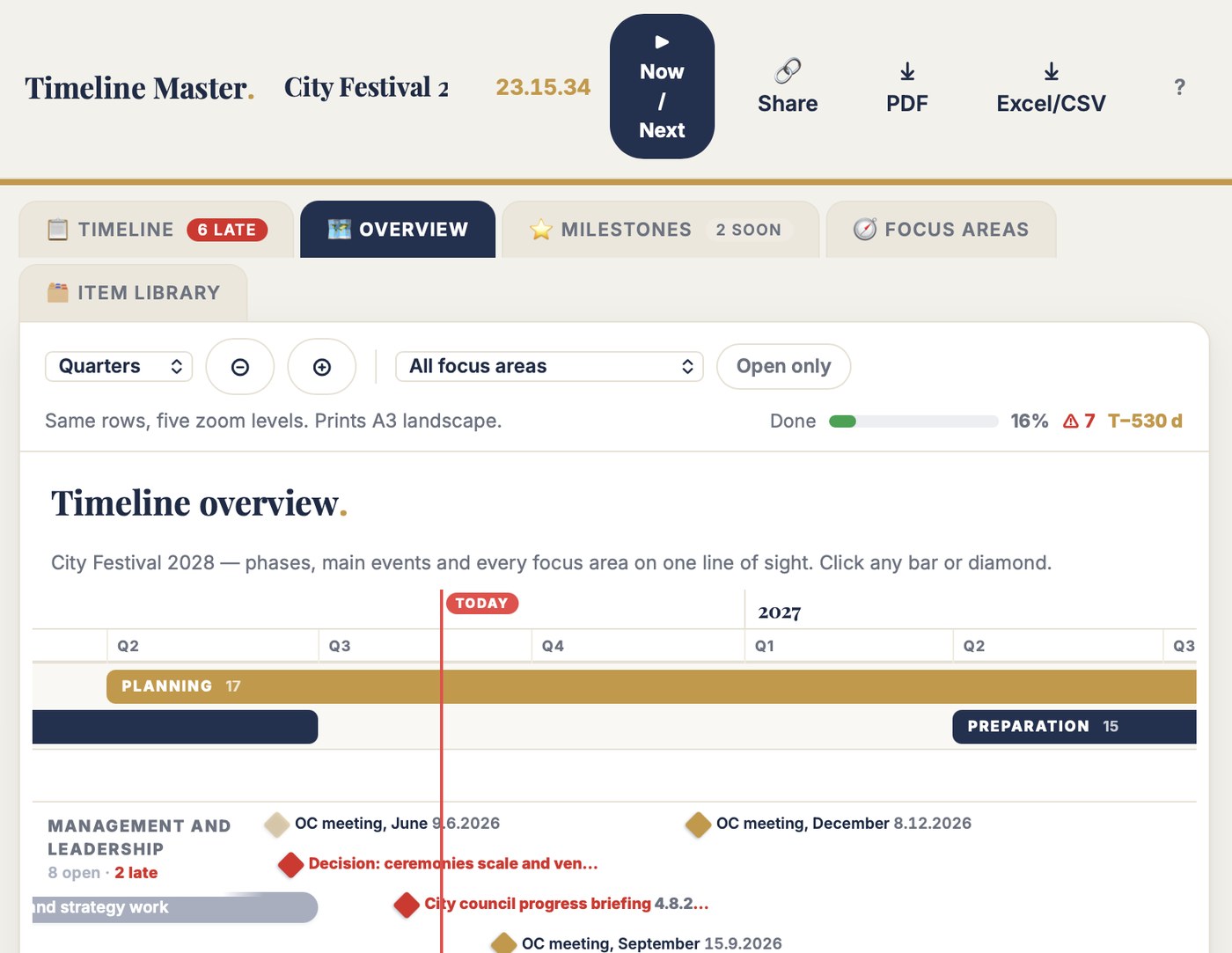
Timeline Master holds the full event journey as rows you can trust: every milestone, deadline, decision and planning window, with a phase, a focus area, an owner and an honest date — an exact day when you know it, a quarter when you don't. Zoom the same timeline from years to weeks. Overdue turns red by itself. Built for the build-up a spreadsheet was never shaped for.
The council gets years, the OC gets quarters, the run-in gets weeks — all from the same rows. That is the whole product.
The quarter sheet and the 169-column week sheet were the same timeline kept as two files that disagreed. Here it's one set of rows: years for the council, quarters for the OC, weeks for the run-in. Change a date and every view already knows.
Q3 2027 is a real date here — drawn a quarter wide, not rounded to a guessed day. Sharpen it to a month, then a day, as the event nears. The timing says what's fixed, what's a target and what's still rough — so nobody defends a date that was never real.
Anything past its date and not done turns red with the days counted; the next 30 days turn gold. The today-line crosses every lane and the countdown to your main event runs in the toolbar. No question marks in brackets standing in for a status.
The free test is the full tool on a real example: a three-year city winter games timeline, 58 items across seven phases and fourteen focus areas — a live countdown, three deadlines already blown, a decision stuck since June. Zoom the Overview from years to weeks. Open ▶ Now / Next.
No account. No email. Nothing saves. Two minutes tells you more than this page can.
| The job | Your spreadsheet | Timeline Master |
|---|---|---|
| The phases | CONCEPT painted into eight cells, PLANNING into five — some with a trailing space, so Excel thought they were different phases. | A phase is wherever its rows are. Its date range and "◉ Now" marker are computed, never painted. |
| A date you don't know yet | "21.2.–4.3.2029 (TBC)" — the risk lives in the brackets. A question mark is not a status. | "Q3 2027" is a real date, drawn a quarter wide, marked target or rough. Sharpen it when reality arrives. |
| Zooming in and out | The week sheet grew to 169 columns. Zoom out meant a second file; zoom in meant scrolling past October. | One set of rows, five zoom levels — years to weeks. The views never disagree. |
| Overdue | "OPERY 28.9. SIIRRETÄÄN" — the reschedule typed into the cell. Nothing turns red on its own. | Past its date and not done turns red with the days counted; the countdown runs in the toolbar. |
| The milestones | "17 Milestones Reached (see comments)" — filed inside a cell comment no meeting ever opened. | Milestones are rows, filtered into their own view, month by month with days-to counters. |
| Each team's slice | Everyone reads the whole grid to find their three rows. | Fourteen focus areas, each with its own lane, owner and "next up" computed. |
These are not invented examples. They are from master timelines that ran world championships, city games and annual events. The timeline logic was right the whole time — phases, focus areas, milestones, honest dates. The grid held everything and showed nothing. Timeline Master keeps the logic and builds in the drawing, the zooming and the chasing.
Timeline Master is for the director or programme lead holding the master timeline of a multi-year event — the one picture the council, the OC and every team read from, and the one asked "where are we?" in every steering meeting.
The 📋 Timeline is the working table: one row per item, grouped by phase, IDs assigned automatically per focus area (MKT-001, REP-004). Getting started, Concept, Planning, Preparation, Implementation, Live, Wrap-up — rename the phases, add your own. Same for the fourteen focus areas. A phase's date range is computed from its rows; nothing is painted.
The other views draw from the same rows: the 🗺 Overview visual timeline (zoomable years to weeks, today as a red line), ⭐ Milestones, 🧭 Focus areas, and ▶ Now / Next for the steering meeting.
▶ Now / Next is the full-screen board for the monthly steering meeting: overdue at the top in red with the days counted, decisions that are waiting, windows that should start in the next 45 days, and the ten nearest key dates — each with its focus area and owner. Leadership items carry a gold ★. Pick one focus area and the board becomes that team's lane.
Between meetings, 🔗 Share makes two view-only links — the working table for the team, or the visual overview for leadership. The data travels inside the link. No account needed, nothing to install.
A three-year build-up runs on one timeline everyone can read. One deadline that slips unseen — because it was painted into a cell nobody re-checked — costs far more than €99. Test first — buy when it earns its place.
Pairs with Commitment Tracker: the timeline says what must happen when — Commitment Tracker chases who owes it. Nine tools in the toolbox — any three for €199.
You can. I did, for world championships — painting phases into cells, filing milestones in comments, keeping a 169-column week sheet beside the quarter grid for the same event. The timeline held everything and showed nothing. If yours shows the whole build-up at a glance, keep it. This is for everyone else.
No. Timeline Master runs in the browser — laptop, tablet or phone. Your events save automatically to your account.
No, on purpose. No task lists, no dependencies between every row, no resource planning. Those live in other tools. This is the master timeline: what needs to happen when, across the full event journey, on one screen the whole organisation can read.
Yes. The phases and the fourteen focus areas are defaults, not rules — rename them, delete them, add your own. A nine-month conference timeline zooms to months and weeks; a four-year games timeline zooms to years and quarters. Same tool, same rows.
Then write the quarter. "Q3 2027" is a valid date here and draws a quarter wide — the timeline stays honest about what is known. Mark it rough or target, and sharpen it to a day when reality arrives.
The full tool on an example event — a three-year city winter games with 58 timeline items, three overdue rows glowing red and a countdown running to the opening ceremony. Open the Overview and zoom; then open ▶ Now / Next. Nothing saves — 100 people can test at once and never see each other's changes.
Two minutes in the demo tells you more than this page can.