For event organisers · Contingency planning

An event contingency plan template you can run. When it happens, it's open in seconds.

Contingency Planner is the tool for what the risk register only points at: what you actually do when a risk realises. One plan per risk — activation trigger, the first 15 minutes, numbered response steps, owners. The tracker writes itself, and the Status Board shows in one screen what's confirmed and what's still a gap.

A contingency plan is a decision you made in peace, executed in noise. This keeps it findable, current and ready. That is the whole product.

Built from real contingency plans / 25+ years of event workOlympic venues, world championships, city events
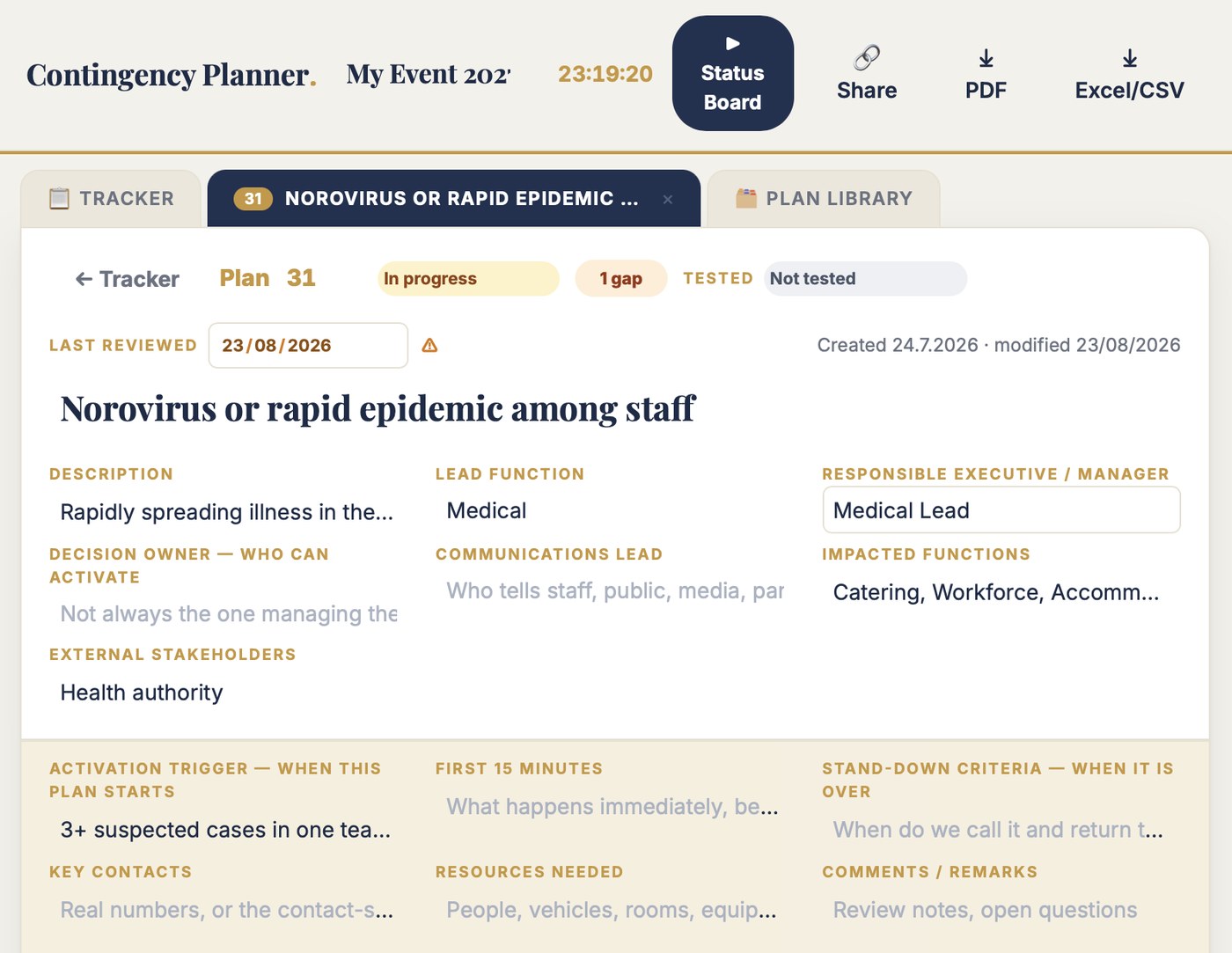
Contingency Planner in use: one plan with its activation trigger, decision owner and the response plan by function
A contingency plan is a decision you made in peace, executed in noise.
Three things it does

Three jobs. Nothing else.

01

The tracker writes itself

Plan count, scenarios, steps, status, readiness — generated from the plans. There is no second sheet to maintain, so it cannot drift out of sync the same week you make it.

02

Steps stay numbered

Response steps renumber themselves when you add, remove or reorder. "Go to step 3" on the radio always means step 3 — never a gap where someone deleted a row and the chain reads 1, 2, 6, 7, 9.

03

It answers "are we ready?"

The Status Board shows confirmed, in review and gaps in one screen. Toggle to gaps only and you're looking at the exact to-do list between today and event week — instead of opening twenty-two sheets.

Don't take my word for it. Break the demo.

The free test is the full tool on a real example event — eight plans in different stages. Open a plan, reorder its steps and watch them renumber. Press ▶ Status Board and read readiness in one screen. Toggle to gaps only.

Name and email to open it. Nothing installed, nothing saved. Two minutes tells you more than this page can.

Excel vs Contingency Planner

The same six jobs. Side by side.

The jobYour workbookContingency Planner
"How many are confirmed?"Twenty-two sheets, one plan each. The answer is opening twenty-two sheets.The Status Board: confirmed, in review, gaps — one screen, whole answer.
The trackerA second sheet, typed by hand. It drifted out of sync the same week it was created.Generated from the plans. There is no second sheet to maintain, so it cannot drift.
The response stepsNumbered 1, 2, 6, 7, 9, 11 — someone deleted rows. On the radio, "go to step 6" points at nothing.Steps renumber themselves. "Go to step 6" always means step 6.
The scenario blocksCopy-pasted with the template showing through — "Type here", empty rows — in a document you'd hand an authority.A clean A4 plan sheet: header, scenarios, numbered steps. Authority-ready.
Finding it on the dayBuried in a workbook on one person's laptop. Needed in minutes; finding it took longer.Open the plan by name or ID from any device, or its view-only link.
Linking to the risksPlans and register drift apart — different names, different order.Paste the register in; plan 14 answers risk 14, ID, lead and owner carried over.
You know this workbook

Serious work by serious people — and the tool fought them the whole way.

  • Twenty-two sheets, one plan each. The steering group asks "how many of these are actually confirmed?" — and the answer is opening twenty-two sheets.
  • The tracker is a second sheet, typed by hand. It drifted out of sync with the plans the same week it was created. Status lives in two places; both are stale.
  • The response steps are numbered 1, 2, 6, 7, 9, 11. Someone deleted rows. On the radio, "go to step 6" points at nothing. I have the file.
  • Copy-pasted scenario blocks with the template still showing through — "Type here", empty rows — in the document you'd hand to an authority.
  • On event day, the one plan you need is buried in a workbook on one person's laptop. It was needed in minutes. Finding it took longer.

These are not invented examples — I have the file. Every plan in it was written by someone who knew exactly what to do. The workbook just couldn't say it out loud when it mattered. Contingency Planner keeps the discipline and replaces the tool.

A file you may recognise

A3.Contingency_plans_ALL_FINAL.xlsx
KindExcel workbook · 22 sheets
Sheet names20. Storm · 31. Noro · 36. Stands full…
Tracker sheetLast matched the plans in week one
Steps on sheet 361, 2, 6, 7, 9, 11

Every plan in it was written by someone who knew exactly what to do. The workbook just couldn't say it out loud when it mattered.

Who it is for

Built for the person who owns "what do we do if".

Contingency Planner is for the operations or safety lead who writes the response plans an authority expects — and who has to find and run the right one, by name, in the minutes after something goes wrong.

This is for you if

  • You run events that need written contingency plans for permits, insurers or a steering group
  • Your plans live as many sheets in one workbook, with a hand-typed tracker that's always stale
  • You want readiness — confirmed, in review, gaps — on one screen for the board
  • You already keep a risk register and want each risk to carry its own response plan

This is not for you if

  • You need a full emergency-management or crisis-comms platform. This is the working event plan set, not a command system
  • You need multi-user simultaneous editing today — one owner edits, everyone else views live
  • Your 22-sheet workbook has always produced the right plan in seconds. Then keep it. You are the exception
What is included

A contingency plan system with an engine.

Each plan holds the header an authority expects — lead function, responsible manager, decision owner, communications lead, impacted functions, stakeholders — plus the fields that make a plan real: an activation trigger, the first 15 minutes, key contacts, resources, stand-down criteria. Per scenario, the numbered response steps. The tracker and the readiness numbers compute themselves.

Start from your risk register: paste its rows and every risk becomes a plan stub with its ID, title, lead and owner carried over. Or start from the plan library — the classic event contingencies, pre-drafted with scenarios and steps.

  • Unlimited events and plans
  • Activation triggers, decision owners, first 15 minutes, stand-down criteria
  • Scenarios with self-numbering response steps
  • The tracker that writes itself — status, readiness, gaps
  • Tested & last-reviewed flags that keep plans alive
  • Paste risks straight from Risk Register or any list
  • Plan library: 16 classic contingencies with suggested triggers
  • Status Board meeting view with the gap list
  • View-only share links · A4 plan sheets · A3 tracker PDF · Excel export
  • Runs in the browser — laptop, tablet, phone. Nothing to install
  • All updates to the current version included
Ready 5/8 · 63%▶ STATUS BOARD
IDPlan — what has happenedActivation triggerLeadStepsReadinessStatus
14Venue parking runs out on peak day85% fill, arrivals at forecastTransportation7ReadyConfirmed
16Below −20 °C on competition days07:00 reading −20 °C or belowOperations3ReadyUnder review
36Stands full while ticket holders arriveSection at 90%, 500+ inboundSecurity7ReadyConfirmed
39Sales and payment systems go downPOS down > 10 min venue-wideSales21 gapIn progress
62Air traffic disruption delays teamsTransportation3 gapsOpen
Also included

Status Board: the view that answers "are we ready?"

Full screen: plans by status, confirmed counts, the gap list. Click a status to see its plans. Toggle to gaps only and you're looking at the exact to-do list between today and event week.

Print it as an A4 status report for the board and the authorities. Twenty-two sheets never answered this question. One screen does.

Plans 8Confirmed 3Ready 63%Tested 5/8⚠ Gaps 3⚠ Stale 4
3 Confirmed
2 Under review
2 In progress
1 Open
62Air traffic disruption delays teams ⚠ 3Open
43Fireworks fall into the crowdUnder review
36Stands full while ticket holders arriveConfirmed
14Venue parking runs out on peak dayConfirmed
Jesse Kiuru walking through an event hall during build-up
Proof

An event director built this. Not a software company.

I'm Jesse Kiuru. I help event organisers and host cities bid, plan and run better events. Event director of the Lahti 2017 FIS Nordic World Ski Championships. Currently structuring the Winter World Masters Games 2028.

Contingency Planner exists because I wrote these plans for a sold-out world championship — 22 of them, one workbook — and one got activated on the busiest Saturday of the event. The plan held. The workbook nearly didn't. The examples on this page are from my own files; this is the version I wish we'd had open in the operations centre.

270,000spectators, Lahti 2017
3,000workforce coordinated
25+ yrschampionships to conferences
Price

€99. Once. That's it.

Most plans are never activated. The one time a plan is needed, it is needed in minutes, by name, with numbered steps — and that once is worth far more than €99. Test first — buy when it earns its place.

Contingency Planner · Full version
€99 one time · no subscription
  • Unlimited events and plans
  • Activation triggers, decision owners, first 15 minutes, stand-down criteria
  • Scenarios with self-numbering response steps
  • The tracker that writes itself — status, readiness, gaps
  • Tested & last-reviewed flags that keep plans alive
  • Paste risks straight from Risk Register or any list
  • Plan library: 16 classic contingencies with suggested triggers
  • Status Board meeting view · A4 plan sheets · A3 tracker PDF · Excel export · all updates included
Get Contingency Planner · €99 → or test it free first — 2 minutes

Pairs with Risk Register: the register says what might happen, the planner says what you do when it does. Ten tools in the toolbox — €99 each.

The toolbox

One of ten tools. Meet the other nine.

Each one replaces one spreadsheet event organisers fight with. Same deal on every tool: test it free on a real example, own it for €99, once. Or see them all at eventmanagement.shop.

Budget Master

The event budget that adds itself up. Total, category splits and cost per participant, computed live.

See Budget Master →

Agenda Master

One agenda table. The client’s visual day grid and the executives’ cheat sheet draw themselves from it.

See Agenda Master →

Rundown Master

Times the run of show. Change one duration and the whole script re-times itself.

See Rundown Master →

Daily Runsheet

Every opening time around the show — gates, catering, crew — computed from the programme by plain-word rules.

See Daily Runsheet →

Timeline Master

The master timeline of a long build-up. Zoom from years to weeks; anything late turns red on its own.

See Timeline Master →

Risk Register

Probability × impact computed, a live heat map, and your top risks on screen in seconds.

See Risk Register →

Venue Population

How many people are on site at every moment, group by group — gold near capacity, red over it.

See Venue Population →

Customer Journey Mapper

Walk the event through each customer group’s eyes and fix the friction before anyone arrives.

See Customer Journey Mapper →

Commitment Tracker

Every promise in every partner deal on its own row, with an owner and a date. Overdue turns red.

See Commitment Tracker →

Questions

Asked before buying.

Can't I just write contingency plans in Word or Excel?

You can. I did, for a sold-out world championship — 22 plans in one workbook, a hand-typed tracker that drifted in week one, steps numbered 1, 2, 6, 7, 9. The thinking was right; the workbook couldn't say it out loud when it mattered. If yours always produces the right plan in seconds, keep it. This is for everyone else.

Do I need to install anything?

No. Contingency Planner runs in the browser — laptop, tablet or phone. Your events save automatically to your account.

Does it work with Risk Register?

Yes, by design. Export your register to Excel/CSV, paste the rows into 📋 Paste risks, and every risk becomes a plan stub with the same ID, title, lead and owner. It also takes any plain list, one risk per line — you don't need Risk Register to use it.

Does the steering group or the authority need accounts?

No. You send a view-only link — the tracker, or the Status Board directly. Or you print: any plan as the classic A4 sheet, the whole tracker as A3 landscape.

What if we never activate a single plan?

Then the event went well. Most plans are never activated — you will probably never look at them again. Write them anyway: the one time a plan is needed, it is needed in minutes, by name, with numbered steps.

What does "free test" mean exactly?

The full tool on an example event with eight plans. Open them, edit steps, check the Status Board, print a plan sheet. Name and email to open it. Nothing saves — 100 people can test at once and never see each other's changes.

The risk register says what might happen.
This says what you do.

Two minutes in the demo tells you more than this page can.

Until 30 September

Need more than one? All ten tools for €299.

Ten tools bought one at a time are €990. Until 30 September 2026 the whole toolbox is €299, one payment. Three tools already cost €297, so the other seven are effectively two euro. On 1 October the price goes up.

One payment · no subscription