For event organisers · Run-of-show planning

Time the moments that matter — and hand your crew one script that holds.

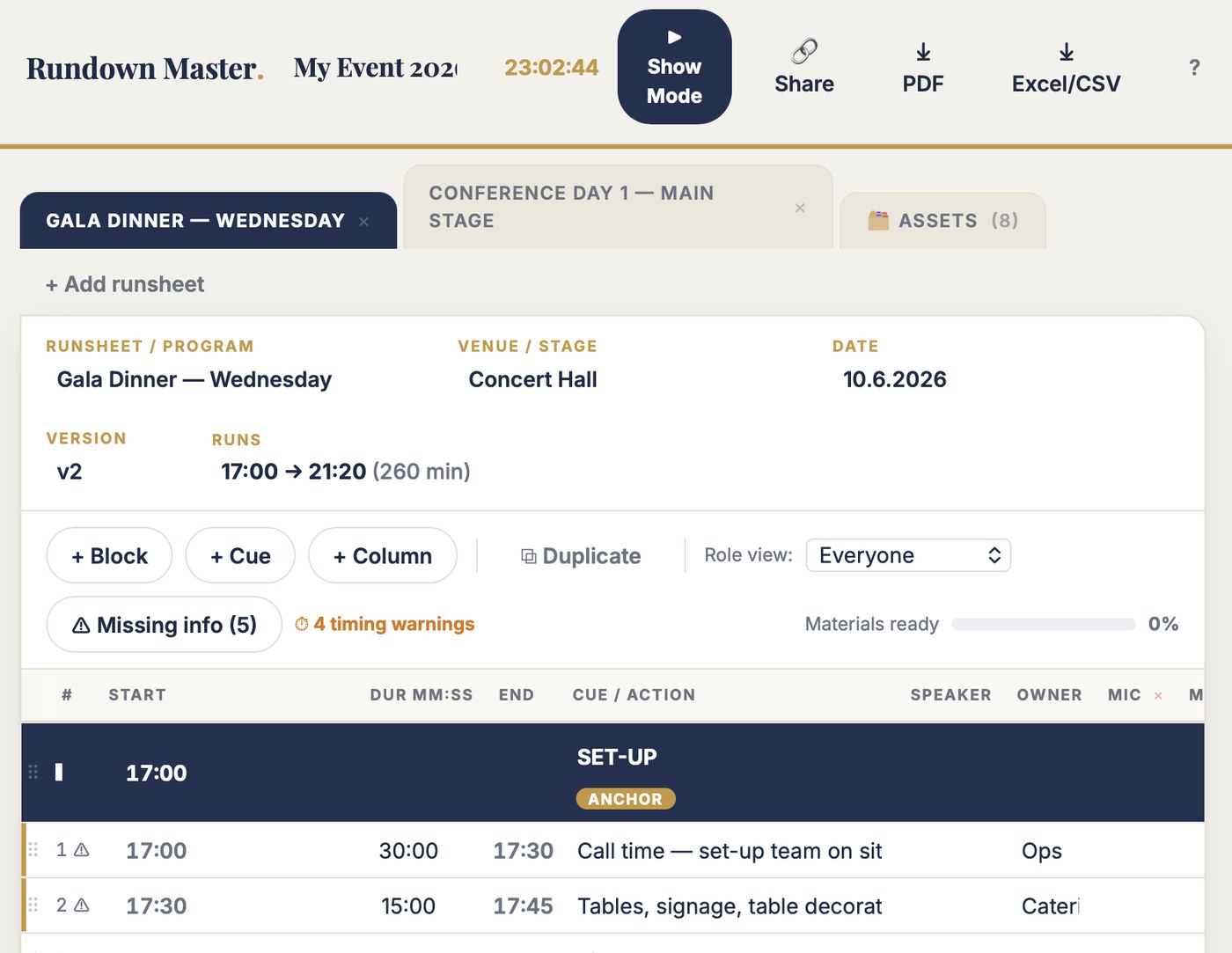
Rundown Master is where you plan and time the run of show: the keynotes, the ceremony, the gala, block by block, cue by cue. Anchor a start, give each cue a duration, and the whole script times itself. Move a keynote, cut a segment, add a break — the timing re-flows in a blink, so you get the important sessions right while there is still time to change them.

Share one link with the technical team and partners. When show day arrives, everyone is working from the same agreed script — not five versions of an Excel. That is the whole product. (A show mode to run it live is included.)

Built from real running orders / 25+ years of event workWorld championships, ceremonies, conferences
Stage and production during a live event
Every cue on that stage was timed and agreed weeks before.
Three things it does

Three jobs. Nothing else.

01

It times the script without formulas

Anchor a block, give each cue a duration, and every start and end time builds itself. There is no formula to break while you edit, so you can shape the timing of the important sessions freely — for weeks — and the clock always adds up.

02

It re-times the whole show in seconds

Move a keynote 40 minutes, cut a segment, add a coffee break — drag one row and the entire script re-times. Getting the run of show right stops meaning re-typing forty rows every time the programme changes.

03

One script, shared, always current

No five versions on the drive. Share a view-only link with the technical team, partners and hosts; everyone sees the current plan. When show day comes, there is one agreed script — and a show mode included to run it.

Don't take my word for it. Break the demo.

The free test is the full tool on a real example event. Add a cue, set a duration and watch the script re-time. Move a keynote and watch the whole evening re-flow. Filter to one role and print it. Then press ▶ Show Mode to see how the same script runs on the day.

No account. No email. Nothing saves. Two minutes tells you more than this page can.

Excel vs Rundown Master

The same six jobs. Side by side.

The jobYour spreadsheetRundown Master
Timing the scriptSomeone types over the formula in C14 while editing. Every start time below it is now wrong — found at rehearsal, if at all.Times chain from durations. There is no formula to break, so you can shape the timing freely.
The programme movesA keynote shifts 40 minutes, and you re-time forty rows by hand — again, and again, all through planning.Drag the row. The whole remaining script re-times in a blink.
Detail for each roleSeven crew roles, so the sheet grows to 74 columns. Nobody can find their own cues.Add the columns your production needs. Filter to one role and print just that.
The version everyone works fromRundown_FINAL_final_USE_THIS.xlsx — five files, one event, zero certainty which is current.One script, one link, always current. No copies to reconcile.
Handing it to the crewA printout emailed round, stale by the next edit.A view-only link for the technical team — or a live show-mode link for the day.
The assetsThe keynote PPT lives in three folders. Nobody knows which is final.One asset library — every PPT, video and song marked ready or missing, attached to its cue.
You know this file

The running order you rebuild for weeks — and it fights you every edit.

  • Someone types over the formula in C14 during an edit. Every start time below it is now wrong, and the sheet says nothing until rehearsal.
  • The programme changes — a session moves, a speaker is added — and you re-time forty rows by hand. Then it changes again next week.
  • Seven crew roles, so the sheet grows to 74 columns. Nobody can find their own cues any more.
  • You email the running order to the technical team. Two edits later, the printout on their desk is fiction, and you're both sure yours is the real one.
  • The keynote PPT exists in three folders. Nobody knows which one is final.

These are from running orders I planned and re-planned for world championships, medal ceremonies and corporate conferences. The logic — anchors, cues, durations, owners — was right the whole time. The spreadsheet punished every edit, so getting the important moments timed right cost days it shouldn't have. Rundown Master keeps the logic and makes the plan easy to change.

A folder you may recognise

Event_Rundown_MASTER.xlsx
Event_Rundown_MASTER_v2.xlsx
Event_Rundown_MASTER_v3-3.xlsx
Rundown_FINAL.xlsx
Rundown_FINAL_final_USE_THIS.xlsx

Five files. One event. Zero certainty which one the technical team is planning from.

Who it is for

Built for the person who plans the run of show.

Rundown Master is for the producer or director who builds and times the script for the moments that matter — the ceremony, the gala, the keynote block — and who needs the whole crew working from one agreed version long before anyone is on stage.

This is for you if

  • You plan the run of show for ceremonies, galas, conferences or launches where timing decides the moment
  • You keep the running order in Excel and rebuild it every time the programme moves
  • You want the important sessions timed right while you can still change them
  • You need the technical team, AV partner and hosts planning from one agreed script

This is not for you if

  • You need the client-facing agenda, not the production script — that's Agenda Master
  • You need an advanced live show-caller with comms and device integration — a show mode is included here, but the core of this tool is planning the script, and dedicated callers do more on the night
  • Your Excel running order has never broken while you edited it. Then keep it. You are the exception
What is included

One script. Timed, shared, ready.

A planning tool for live sessions. Blocks carry anchor times. Cues chain automatically: each one starts when the previous ends. Change a duration, drag a row, cut a segment — the clock recalculates every time, and it cannot break. This is where you get the run of show right: the timing, the cues, who owns what, what's on each screen.

Share one link and the technical team, AV partner and hosts all plan from the same script. When the day comes, a full-screen show mode is included to run it — but the work that makes the evening hold is done here, in planning.

  • Unlimited events and runsheets
  • Automatic time chain — durations, not formulas
  • Drag & drop rows; the whole script re-times
  • Custom columns per runsheet — screens, mics, lighting, comms
  • Overlaps flagged, not hidden
  • Asset library with owner and ready-status
  • A view per role — filter and print A3 landscape
  • One source of truth — view-only share links for the crew
  • Show mode included: live clock, current cue, late-shift control
  • A3 landscape PDF and Excel/CSV export
  • Runs in the browser — laptop, tablet, phone. Nothing to install
  • All updates to the current version included
▶ SHOW MODE
StartDurEndCue / ActionSpeakerMicScreen
18:30DINNER PROGRAMANCHOR
118:30218:32Welcome — introduce the MayorHostHand ×1Event logo
218:32518:37Mayor's welcome speechMayorHand ×1Name slide
318:370:3018:37Transition — podium outFade to dark
418:37318:40Orchestra: opening pieceOrchestraTitle slide
518:401018:50Orchestra: main setOrchestra
Also included

Show mode: the view that runs the room.

When the planning is done, ▶ Show Mode runs the same script on the night: full screen, live clock, the current cue highlighted with a countdown, the next cues below. A speaker runs over? Tap +1 minute and the remaining schedule shifts.

It's a bonus, not the point — if you need an advanced live caller, dedicated tools do more. What matters here is that the script you ran the room with is the exact one you planned and agreed, with no re-typing in between.

−1 min+4 min late+1 min
18:34–18:41Mayor's welcome speech
18:41–18:44Orchestra: opening piece — 1:12 remaining
18:44–18:54Orchestra: main set
18:54–18:56Applause / conductor interview
18:56–19:36Main course served
Jesse Kiuru walking through an event hall during build-up
Proof

An event director built this. Not a software company.

I'm Jesse Kiuru. I help event organisers and host cities bid, plan and run better events. Event director of the Lahti 2017 FIS Nordic World Ski Championships. Currently structuring the Winter World Masters Games 2028.

Rundown Master exists because I planned running orders in Excel for 25 years — and the hard part was never the night, it was the weeks of edits before it, where the timing broke and the versions multiplied. The logic in this tool is the logic that survived those events; it just makes the plan easy to change. The examples on this page are from my own files.

270,000spectators, Lahti 2017
3,000workforce coordinated
25+ yrschampionships to conferences
Price

€99. Once. That's it.

Rundown tools priced as subscriptions cost €300–1,200 per year. One run of show timed right — and one agreed script instead of five Excel versions — is worth that before the doors even open. Test first — buy when it earns its place.

Rundown Master · Full version
€99 one time · no subscription
  • Unlimited events and runsheets
  • Automatic time chain — plan without formulas
  • Drag & drop re-timing, custom columns per runsheet
  • Asset library with ready-tracking
  • One-source view-only share links for the crew
  • Show mode included — live clock, late-shift control
  • A3 landscape PDF and Excel export
  • All updates to the current version included
Get Rundown Master · €99 → or test it free first — no account, 2 minutes

Pairs with Daily Runsheet: Rundown Master times the show, Daily Runsheet times the whole event day around it. Nine tools in the toolbox — any three for €199.

Questions

Asked before buying.

Can't I just build this in Excel?

You can. I did, for 25 years — and the timing broke every time I edited it, and the versions multiplied. The logic was right; the fragile clock and the copies were the problem. If your running order survives weeks of edits without breaking, keep it. This is for everyone else.

Is this a live show-caller?

No — its core is planning. You use it to time the run of show, get the important sessions right, and share one agreed script with the crew. A show mode is included to run it on the day, but if you need advanced live calling — comms, device cues, redundancy — dedicated show-caller software does more. Most organisers need the plan right first; that's what this does.

Do I need to install anything?

No. Rundown Master runs in the browser — laptop, tablet or phone. Your events save automatically to your account.

Does my technical team need accounts?

No. You send them a view-only link. They plan from the current script, or open the live show mode, and cannot break anything.

Can I still get my Excel and PDF?

Yes. Every runsheet exports to CSV (opens in Excel) and prints to A3 landscape. The spreadsheet becomes an output, not the tool you fight while planning.

What does "free test" mean exactly?

The full tool on an example event. Build cues, set durations, drag rows and watch the script re-time; filter by role; then run show mode. Nothing saves — 100 people can test at once and never see each other's changes.

Plan the show once. Share it once.
Walk in with one script.

Two minutes in the demo tells you more than this page can.