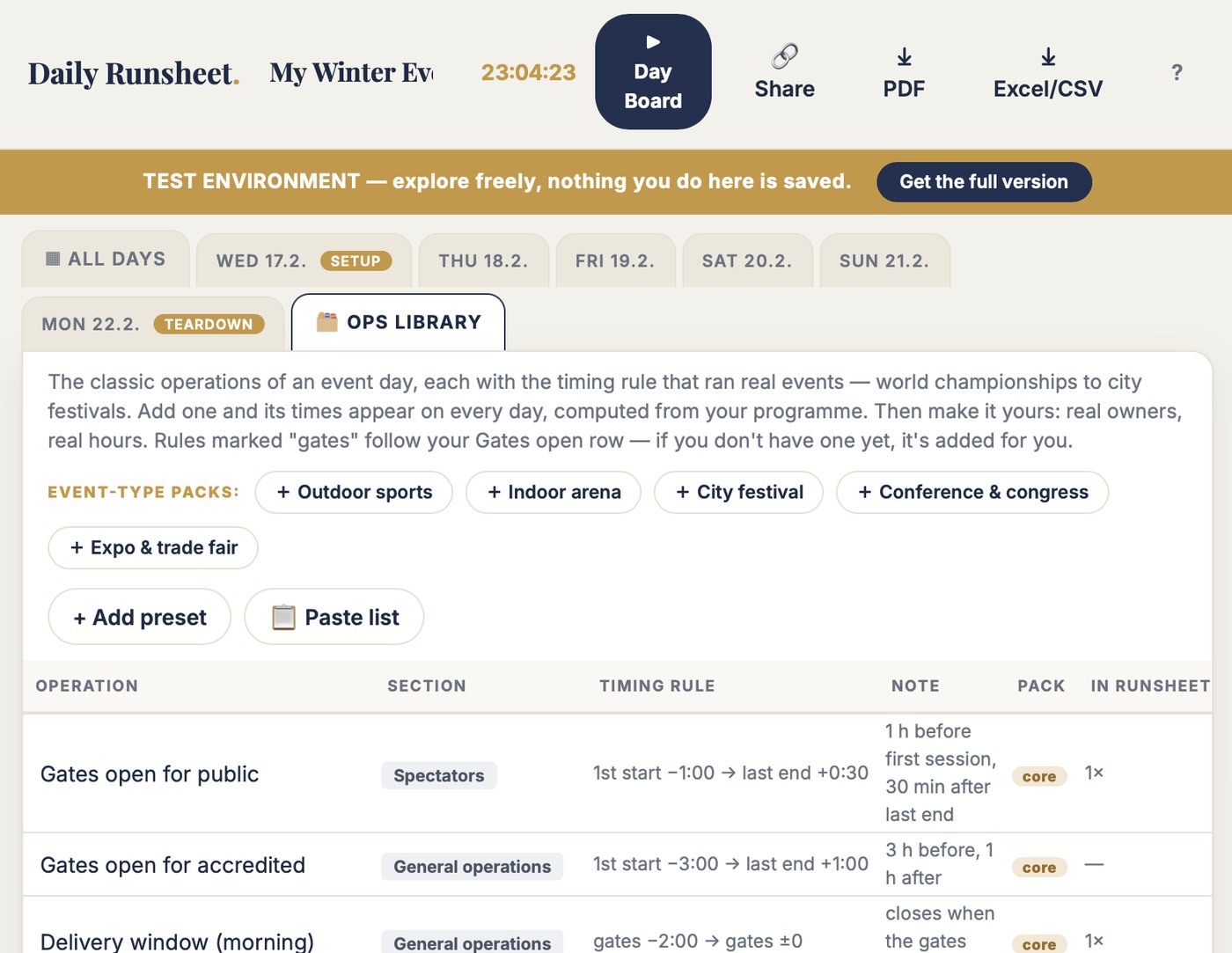
Daily Runsheet is the schedule for everything around the show: gates, deliveries, accreditation, catering, briefings, security — every day of the event, build-up to teardown. Set the rule once — "gates open one hour before the first session" — and every day computes its own times from the programme. Change the programme, the whole event re-times itself.
The times are computed in peace, weeks early, from rules everyone agreed on. On the day it runs itself. That is the whole product.
Gates open first start −1:00. Deliveries run until the gates. Debrief is last end +0:30. Set the rule once; every day computes its own times. The logic that lived in one person's head now lives on the row.
Deliveries end when the gates open, gates follow the programme. Move one session and thirty operations across six days re-time together. Nothing is copied, so nothing drifts — no ditto chain quietly wrong since Tuesday.
Type over any computed time and the cell turns gold — everyone sees it left the rule. The rule is remembered; one click puts the day back on it. No more a second row literally named "HAND FIXED Gates Open times".
The free test is the full tool on a real example: six days, build-up to teardown, thirty operations on rules. Move a session time and watch the day re-compute. Hand-fix one day and watch it turn gold. Press ▶ Day Board and see the ops-centre view.
No account. No email. Nothing saves. Two minutes tells you more than this page can.
| The job | Your spreadsheet | Daily Runsheet |
|---|---|---|
| A timing rule | =IF(AND(ISBLANK(F$9),ISBLANK(F$14)),0.29166… — 07:00 hardcoded as a fraction. One person understands it. They're on holiday. | "First start −1:00" reads in plain words, on the row. Anyone can see it and change it. |
| The whole event | 44 columns, 13 days. By Thursday the row names have scrolled off the screen and you're setting times for a row you can't see. | All days on one grid, each day tagged — plus a detail tab per day. No horizontal archaeology. |
| "Same as yesterday" | Ditto chains: =F32, =G32, =I32 copied across the week. One day differs — nobody notices until volunteers are outside a locked gate. | Chains hold: deliveries follow gates follow programme. Change one, the chain re-times. Nothing drifts. |
| Overriding a time | A whole second row named "HAND FIXED Gates Open times", because overriding the formula destroys it. | Type over it; the cell turns gold. The rule is remembered, one click reverts. |
| Which event is this | File says 2020, sheet says 2029, title inside says 2018. Copied event to event for a decade. | One event, its own runsheet. Duplicate it for the next one cleanly, rules and all. |
| The copy for partners | Emailed tabs, one version behind, printed on the wrong morning. | A view-only link — the grid or the Day Board — plus A4 day sheets and A3 PDF. |
These are not invented examples — I have the file. Every rule in it was right: gates an hour before the first start, deliveries until the gates, briefing at 8:15. The sheet just couldn't hold the rules — only the numbers they produced. Daily Runsheet keeps the rules and loses the fight.
A file you may recognise
Every rule in it was right. The sheet just couldn't hold the rules — only the numbers they produced.
Daily Runsheet is for the operations lead who owns the times every function reads — gates, deliveries, accreditation, catering, security — across every day from build-up to teardown.
Rows are your operations, grouped by customer group — teams, media, spectators, VIPs, volunteers, organisation. Columns are your days. Programme sections anchor each day; every other row can compute its times from the first start, the last end, or another row.
Each day also has its own tab: the full day in time order, printable as the A4 day sheet for the ops centre wall and the morning briefing. The whole grid prints A3 landscape, exports to Excel, and travels as a view-only web link.
| Operation | Rule | WED17.2. SETUP | THU18.2. | FRI19.2. | SAT20.2. |
|---|---|---|---|---|---|
| MAIN PROGRAMME PROGRAMME | |||||
| Competition session 1 | programme | — | 14:00–15:30 | 11:00–12:30 | 11:30–13:00 |
| SPECTATORS | |||||
| Gates open for public | 1st −1:00 → last +0:30 | — | 09:00–20:30 | 07:30–17:45 | 07:30–22:30 |
| Ticket control active | Gates open → Gates open | — | 09:00–20:30 | 07:30–17:45 | 07:30–22:30 |
| GENERAL OPERATIONS | |||||
| Delivery window (morning) | Gates −2:00 → Gates | 08:00–18:00 ✦ | 07:00–09:00 | 05:30–07:30 | 05:30–07:30 |
| Accreditation centre open | 1st −3:00 → last +1:00 | 12:00–19:00 ✦ | 07:00–21:00 | 05:30–18:15 | 05:30–23:00 |
| ORGANISATION | |||||
| Morning briefing (all functions) | manual | 08:15–08:30 | 08:15–08:30 | 08:15–08:30 | 08:15–08:30 |
| Venue team daily debrief | last +0:30 → +1:00 | — | 20:30–21:00 | 18:00–18:30 | 22:30–23:00 |
Full screen, dark, built for the wall of the operations centre. What's open right now. What opens next, with a countdown. What's done. Filter by owner and each function watches its own day.
On the day it runs itself — because the times were computed in peace, weeks earlier, from rules everyone agreed on. Print it as the A4 day report for the morning briefing.
One locked gate with volunteers standing outside it costs more than this in goodwill alone. So does one function reading last week's times off the wrong printout. Test first — buy when it earns its place.
Pairs with Rundown Master: the rundown runs the show minute by minute, the runsheet runs everything around it. Nine tools in the toolbox — any three for €199.
You can. I did, for a thirteen-day world championship — a 44-column sheet with formulas only I understood. The rules were right for ten years; the file fought us for ten years. If your sheet has never left anyone outside a locked gate, keep it. This is for everyone else.
No. Daily Runsheet runs in the browser — laptop, tablet or phone. Your events save automatically to your account.
The rundown is the show: cues, minutes, one session at a time. The runsheet is everything around the show: gates, deliveries, services, offices — across all days of the event. Rundown Master answers "what happens next on stage." Daily Runsheet answers "when are we open, and when do we need to be there." Serious events run both.
That's exactly when rules beat typed times. Build the operations on rules now — gates first start −1:00, deliveries until gates — with a placeholder programme. When the real session times land, type them in and the whole event re-times itself. No TBC cells waiting to be forgotten.
Type them as they are. The runsheet understands that 06:00 after 22:00 means the next morning, on every day, without a formula.
The full tool on an example event — six days, thirty operations, the rules doing the work. Move a session time and watch the day re-compute. Nothing saves — 100 people can test at once and never see each other's changes.
Two minutes in the demo tells you more than this page can.