For event organisers · Event & conference budgets

Every number the client asks. Right, live, from one table.

Enter each cost line once: block, category, supplier, quantity × price. Budget Master computes the rest — the total, the split by category and by event block, the cost per participant. Change a price and every number follows. There is no formula to break, because there is no formula to type.

You walk into the steering meeting knowing the total holds. That is the whole product.

Built from real budgets / 25+ years of event workWorld championships, corporate conferences
Calculator and budget documents on a desk
Total, per category, per block, per participant — one table answers all four.
Three things it does

Three jobs. Nothing else.

01

It adds itself up

Grand total, category totals, block subtotals, cost per participant — computed live from the cost lines. There is no summary section to maintain and nothing to type over. Change a price once. Every number follows.

02

It catches broken numbers

Type "about 60" into a quantity and the cell turns red. In a spreadsheet that line becomes a silent zero, and the total lies until someone notices. Usually the client.

03

It separates guesses from committed money

Every line is an Estimate, an Offer, Booked or Confirmed. One bar shows how much of the budget is real. Cancel a line and it strikes through, drops out of every total, and logs itself. "Can we still cut catering?" has an answer.

Don't take my word for it. Break the demo.

The free test is the full tool on a real example: a three-day partner summit, 58 budget lines, eight blocks, offers, bookings and two honestly cancelled lines. Change a price. Watch every total follow. Type "about 60" and watch the cell turn red.

No account. No email. Nothing saves. Two minutes tells you more than this page can.

Excel vs Budget Master

The same seven jobs. Side by side.

The jobYour spreadsheetBudget Master
The grand total=SUM(E18*G18) hand-copied down 250 rows. One typed-over cell and the total is wrong with a straight face.Computed from the cost lines. There is no total cell to type over.
Cost per participantDivided by a hand-picked cell — 300 in one row, 250 in the next, 208 where someone remembered the hotel pax. Which one did the client see?Pax set once, per block where it differs. Computed overall and per block, always current.
Category totalsA SUMIF hunting a letter column. One row says "I " with a trailing space — silently dropped from Other Costs. Nobody is told.Category picked from a list. Every line counted, every time.
Cancelling a costThree edits by hand: status text in a cell, quantity to zero, a minus-row at the bottom. Miss one and the story doesn't add up.One status change. The line strikes through, leaves every total, and the change log writes itself.
A number like "about 60"Counts as zero. The total is short by thousands and says nothing.The cell turns red. You fix it before the client finds it.
The client's copyAn email attachment — one version behind the moment you press send.A view-only link straight into the Budget Overview. Always the current numbers. They change nothing.
Version controlBudget_v17_FINAL_final.xlsx, plus a copy of the sheet inside the same workbook.One budget. The change log is the history.
You know this file

These are from real event budgets. Maybe also from yours.

  • Every total is =SUM(E18*G18) — a SUM that multiplies, typed 250 times. One row copied wrong and the grand total lies quietly for months.
  • The follow-up column points at a deleted row: =SUM(O300-#REF!). It has said #REF! since March. Everyone scrolls past it.
  • Cancelled costs get "cancelled 7.4. — moved to HQ" typed into a text cell, the quantity set to 0, and a hand-typed minus row at the bottom. Three edits per change.
  • The comparison formula is =SUM(E7/F7-100%) — a SUM that divides. It works, until it doesn't, and no one can say which.
  • The header row of the 2022 file reads Column1 … Column9. That budget ran a real event.

These are not invented examples. They are lines from budget files that ran world championships and corporate conferences. The structure in them was right the whole time — blocks, categories, qty × price, status. The tool around it was fragile. Budget Master keeps the structure and deletes the formulas.

📄 Event Budget and Follow-up_v17042026.xlsx — two jobs, one fragile sheet
📄 Kopio CONFERENCE 2026_v1704… — a copy of the sheet, inside the same workbook
📄 Budget ver 1.0 / ver 1.1 / "> 9.2.2012" — versions typed into cells
The comparison formula=SUM(E7/F7-100%) — a SUM that divides
Follow-up column, row 300#REF! since March
Header row, 2022 fileColumn1 … Column9
Category letter, row 278"I " — the space SUMIF can't see
Status cell, row 39"cancelled 7.4. — moved to HQ"
Who it is for

Built for the person who answers for the number.

Budget Master is for the organiser who presents the budget to someone — a client, a board, a steering group — and gets asked "what does it cost per participant?" in every meeting.

This is for you if

  • You produce conferences, corporate events, summits or sports events and the budget is your document
  • You build the first working budget for client discussion and approval, and keep it current through the planning months
  • You have inherited a budget spreadsheet you don't fully trust — and you're the one presenting its total
  • You want co-organisers and the client to see current numbers without emailing attachments

This is not for you if

  • You need accounting: invoices, ledgers, approval workflows. This is the working budget, not the books
  • You need multi-user simultaneous editing today — one owner edits, everyone else views live
  • Your spreadsheet genuinely never breaks. Then keep it. You are the exception
What is included

One master table. Every answer.

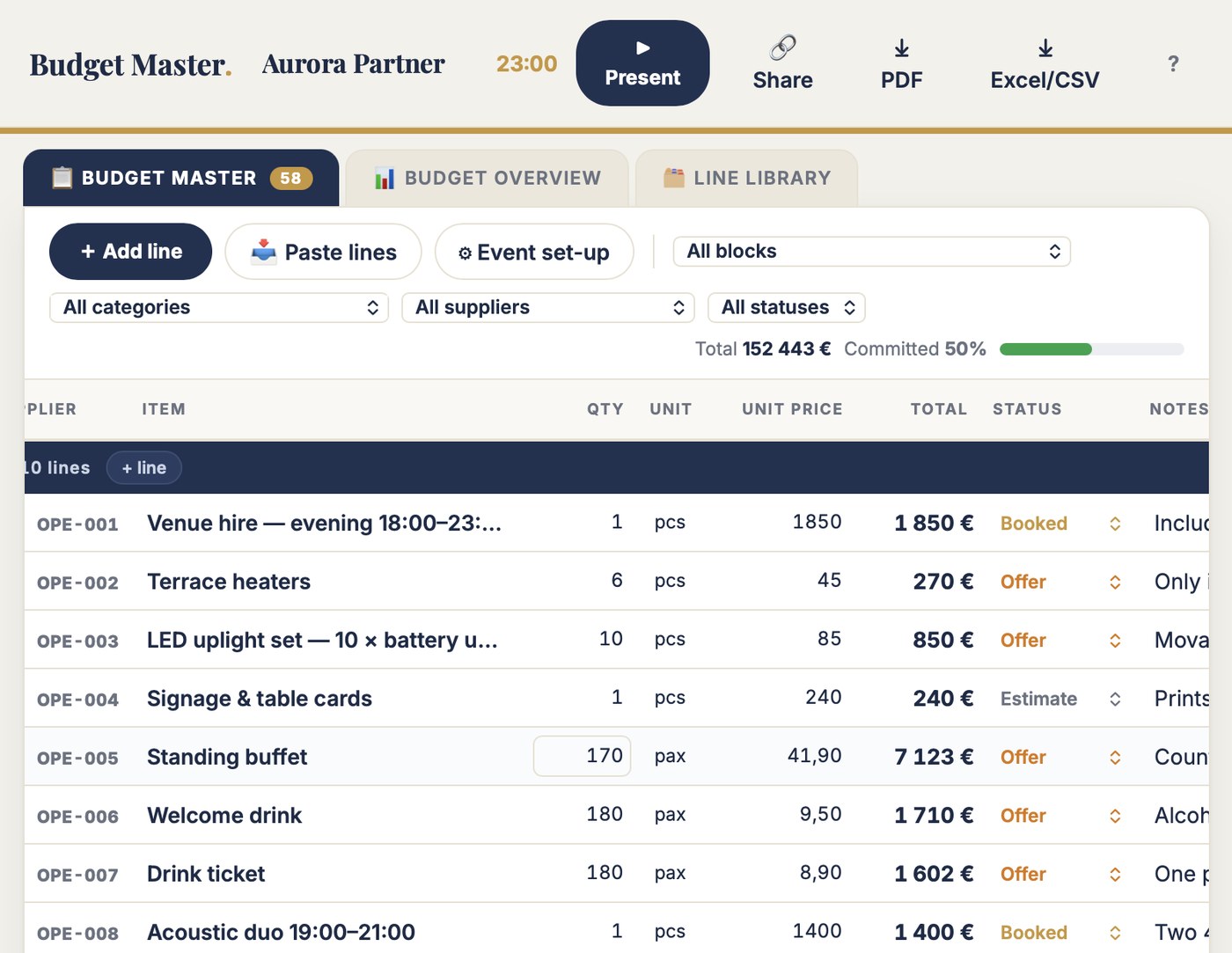
The Budget Master table is your working view: one row per cost line, grouped by event block. Line IDs assign themselves — OPE-001, PAR-007 — and each block header carries its subtotal and per-person cost, live. Write 35,02 the way you write it.

The Budget Overview is the client's view: total, cost per participant, split by category and block, committed versus open. Drawn live from the master table — never one version behind.

  • Unlimited events, blocks and budget lines
  • Totals by category and block, cost per participant — computed live
  • Statuses: Estimate, Offer, Booked, Confirmed, Cancelled
  • Cancelled lines struck through, out of every total
  • Change log that writes itself
  • Your own columns — cost centre, VAT class, anything
  • Line library: the standard costs of a corporate event, with honest notes
  • Present mode for meetings
  • Two view-only share links: working + client
  • A3/A4 PDF print · CSV that opens clean in Finnish Excel
  • Runs in the browser — laptop, tablet, phone. Nothing to install
  • All updates to the current version included
Aurora Partner Summit 2027 Committed 50% ▶ Present
IDItemSupplierQtyUnit priceTotalStatus
PARTNER AWARDS DINNER — WEDNESDAY PAX 210 · 22 533 € · 107,30 € / PAX
PAR-001Hall hire 17:00–24:00Old Mill Hall12 950,002 950 €Booked
PAR-003Three-course dinnerOld Mill kitchen20052,0010 400 €Offer
PAR-006Awards host / MCArtist agency11 600,001 600 €Booked
PAR-010Security & cloakroom (mandatory)SafeCrew3 pcs?210,000 €Confirmed
EVENT INVESTMENT TOTAL 152 443 € · 692,92 € / PARTICIPANT (220 PAX)
Also included

Present: the budget meeting, on one screen.

Full-screen view for steering meetings and client calls: the total, cost per participant, committed versus open, category bars, block totals. Large type, live clock. Nobody reads a 250-row spreadsheet off a wall. This they read.

Between meetings, 🔗 Share makes two view-only links — the full master table for co-organisers, the Budget Overview for the client. The whole budget travels inside the link. No account needed, nothing to install.

Budget Master. Aurora Partner Summit 2027 10:47:12
BUDGET OVERVIEW · 152 443 € TOTAL · 692,92 € / PARTICIPANT · COMMITTED 50%
A · Accommodation53 620 €
C · Catering45 277 €
D · Programme & technical17 722 €
B · Venue12 910 €
E · Production & staff8 930 €
G · Transport5 180 €
Jesse Kiuru
Proof

An event director built this. Not a software company.

I'm Jesse Kiuru. I help event organisers and host cities bid, plan and run better events. Event director of the Lahti 2017 FIS Nordic World Ski Championships. Currently structuring the Winter World Masters Games 2028.

Budget Master exists because I budgeted twenty years of events in the same workbook — every total a hand-typed formula, the categories a letter column feeding a SUMIF, the follow-up column pointing at #REF! since somebody deleted a row in March. The examples on this page are from my own files. That is the proof this tool stands on: the problems are real, because they were mine.

270,000spectators, Lahti 2017
3,000workforce coordinated
25+ yrschampionships to conferences
Price

€99. Once. That's it.

One "about 60" caught before the client sees it pays for the tool. So does one hour not spent hunting a broken SUMIF the night before the steering meeting. Test first — buy when it earns its place.

Budget Master · Full version
€99 one time · no subscription
  • Unlimited events, blocks and budget lines
  • One master table — every total computed from it live
  • Totals by category and event block, cost per participant
  • Commitment tracking: estimates, offers, booked, confirmed
  • Cancelled lines struck through and out of every total
  • Your own columns — cost centre, VAT class, anything
  • Line library — the standard costs of a corporate event, with honest notes
  • Present mode · view-only share links (working + client) · A3/A4 PDF · Excel/CSV · all updates included
Get Budget Master · €99 → or test it free first — no account, 2 minutes

Pairs with Agenda Master: the agenda sells the programme, Budget Master sells the number under it. Seven tools in the toolbox — any three for €199.

Questions

Asked before buying.

Can't I just build this in Excel?

You can. I did, for twenty years, and the structure was right the whole time — blocks, categories, qty × price, status. What broke was the tool: formulas typed over, SUMIFs missing rows, #REF! nobody fixed. If your version never breaks, keep it. This is for everyone else.

Do I need to install anything?

No. Budget Master runs in the browser — laptop, tablet or phone. Your events save automatically to your account.

Is this accounting software?

No, and on purpose. This is the first working budget — the one you build for client discussions and approval, and keep current through the planning months. No invoices, no ledgers, no approval workflows. When the event is over, your bookkeeper still does the books; they just get a budget that adds up.

Does it track actuals against the budget?

Version one is the budget side, kept honest: statuses tell you which numbers are estimates and which are committed money. If you track actuals, add an "Actual" column with + column — it rides along in print and CSV. A dedicated follow-up view is on the roadmap; buyers get updates to the current version free.

Can the client edit the budget?

No — and that's the feature. The client gets a view-only link that opens straight into the Budget Overview: total, categories, blocks, per participant. They see the current numbers, always; they change nothing. The full line-level table stays yours.

What does "free test" mean exactly?

The full tool on an example event — a three-day partner summit budget with 58 lines, eight blocks, offers, bookings and two honestly cancelled lines. Change a price and watch every total follow. Nothing saves — 100 people can test at once and never see each other's changes.

"What does it cost per participant?"
You'll know.

Two minutes in the demo tells you more than this page can.