For event organisers · Experience & journey planning

You catch the 40-minute queue in April, not on the day.

Customer Journey Mapper walks your event through the eyes of every customer group — delegates, speakers, sponsors, VIPs — step by step, before, during and after. One journey table shows where the day can fail for each of them, and pushes the moments worth extra care into a WOW sheet with a decision on every idea. Built for B2B conferences. Works for any event.

Seven audiences, one table — so the mic check nobody owned and the queue nobody planned surface while you can still fix them. That is the whole product.

Built from real journey sheets / 25+ years of event workWorld championships, corporate conferences
Conference delegates arriving at a venue
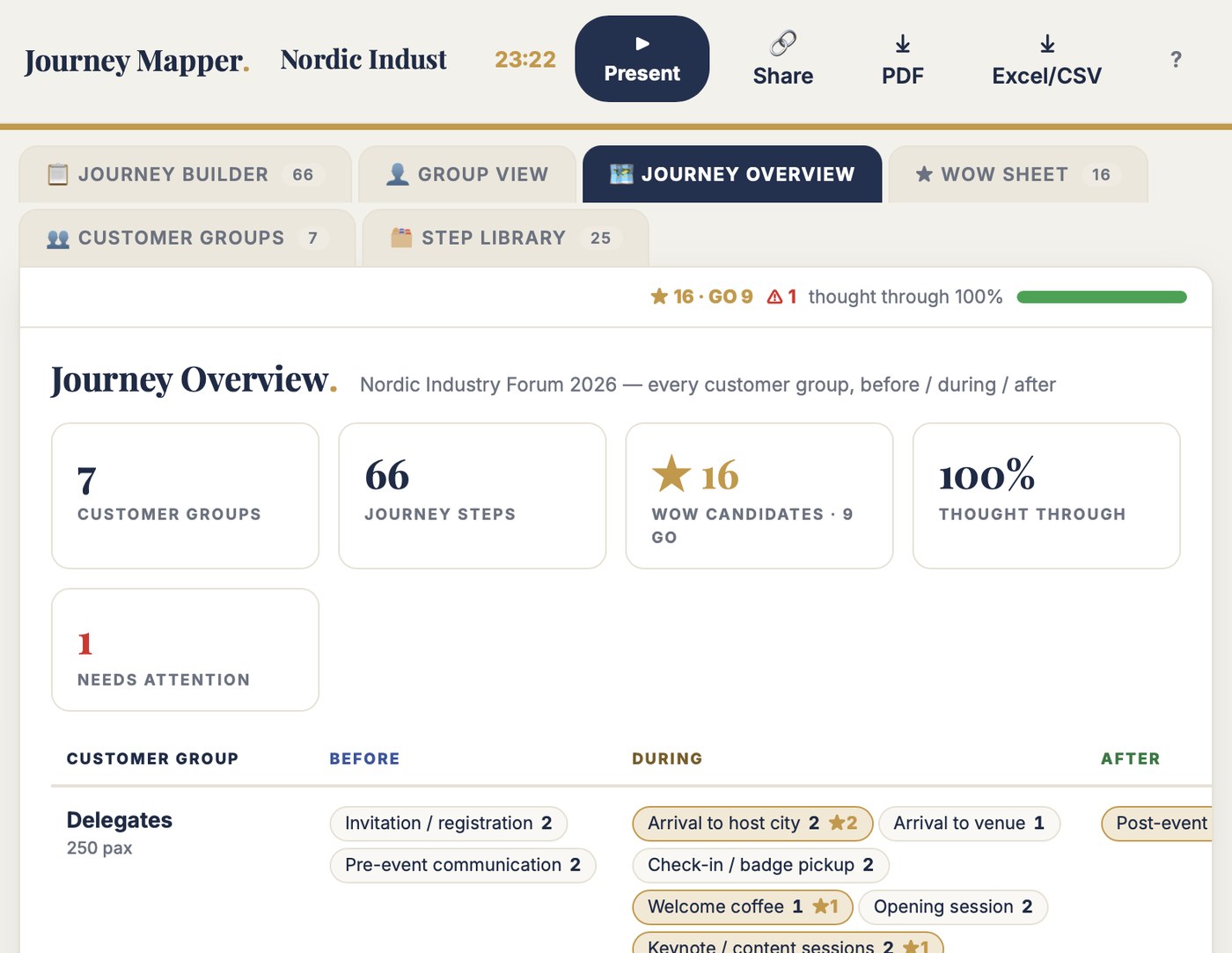
Before, during, after — for every customer group, one table holds the answer.
Three things it does

Three jobs. Nothing else.

01

Seven journeys, one table

Each customer group has its own section — no copies, no second workbook. Build the delegate journey once, copy it to VIPs, keep what applies. Step IDs assign themselves and stay IDs; no spreadsheet turns your 1.1 into New Year again.

02

Five questions that find failures early

What are they trying to do? Where can it fail? What should they feel? What have we planned? What's the one better idea? Answer them in April and the check-in queue never happens on the day.

03

A WOW pipeline, not seventeen ticks

Star the moments worth extra care; they land in the WOW Sheet with a smile factor, a GO / waiting list / no-go decision, an owner and a budget note. The journey finds the moments; the sheet develops the best ones. Not every step needs a wow.

Don't take my word for it. Break the demo.

The free test is the full tool on a real example: a two-day B2B conference, seven customer groups, 66 journey steps, frictions, owners and 16 wow candidates. Star a step and watch it land in the WOW Sheet. Walk one group's day in Present mode.

No account. No email. Nothing saves. Two minutes tells you more than this page can.

Excel vs Journey Mapper

The same six jobs. Side by side.

The jobYour spreadsheetJourney Mapper
Seven audiencesOne sheet per group meant copies. Delegates in the workbook, speakers in an email, VIPs in someone's head. A change reached one of three.Every group's journey in one table. Copy one, adapt it — a change is made once.
The step IDs1.1, 1.2, 2.1 — until Excel decided they were dates. Step 1.1 now happens on 1 January 2022.DEL-001, SPE-004 assign themselves and stay IDs. No New Year surprises.
Marking each stepSeventeen checklist columns per step, so heavy the mapping died at the car park. Nobody reached row two.One CX sweet spot per step. The default view stays light, so the thinking gets done.
The wow ideasA second workbook the journey never met, pointing back at step numbers that had turned into dates.Star a step; it appears in the WOW Sheet — smile factor, decision, owner, budget — linked to the step.
A paste gone wrongA status cell has read "Aikuiset viihtyjät" since 2022 — a paste one column left, and nobody dares fix it.Fields are typed, not pasted into a grid. A dropdown can't hold a target group by mistake.
The client's picture47 columns nobody outside the workbook could read.A Journey Overview link: every group, before / during / after, wow moments and gaps flagged.
You know this file

The journey sheet had 47 columns. Nobody reached row two.

  • Seventeen checklist columns per step — Customer Service, WC, Weather, Stars, MyGroup — so heavy that the journey mapping died somewhere around the car park. The delegate never made it into the building.
  • The step IDs were 1.1, 1.2, 2.1 — until Excel decided they were dates. Step 1.1 now happens on 1 January 2022. Step 2.1 happens in 2010.
  • One sheet per customer group meant copies. The delegates' journey lived in the workbook, the speakers' journey in an email thread, the VIPs' journey in somebody's head. A change reached one of the three.
  • The wow ideas lived in a second workbook the journey never met — graded by a smile factor, decided GO or no-go, and pointing back at step numbers that had meanwhile turned into dates.
  • One paste landed a column left, and a status cell has said "Aikuiset viihtyjät" — a target group, in Finnish — since 2022. Nobody dares to fix it because nobody knows what was there before.

These are not invented examples. They are from journey sheets that planned real events. The questions were right the whole time — what are they trying to do, where does it fail, what's the one better idea. The 47 columns punished thinking. Journey Mapper keeps the questions and deletes thirty columns.

📄 Event Customer Journey Sheet_EXAMPLE.xlsx — 47 columns, A to AU
📄 event customer wow sheet_excel.xlsx — a second workbook, hand-linked by step numbers
ID column, row 151.1. → 2022-01-01 — Excel made it New Year
Checklist columns L–AB17 ticks per journey step
Status cell, WOW row 15"Aikuiset viihtyjät" — a paste gone one column left
Sub-group columnsAM, AN, AO, AP, AQ, AR + Remarks
Modified at, row 142017-09-17 — the last time anyone dared
Who it is for

Built for the person who owns the experience, not just the schedule.

Customer Journey Mapper is for the producer or experience lead who has to answer for how the event feels — to every audience, before, during and after — and who wants the friction found in a planning workshop, not in a post-event survey.

This is for you if

  • You plan B2B conferences or events with several audiences — delegates, speakers, sponsors, VIPs
  • You want the moments that can fail each group surfaced early, in plain words the client understands
  • You collect "wow" ideas and need a way to decide which ones actually get delivered
  • You want the client to see the before / during / after picture without a 47-column sheet

This is not for you if

  • You need the production rundown (who pushes which button at 19:02) — that's Rundown Master — or the agenda itself, which is Agenda Master
  • You need multi-user simultaneous editing today — one owner edits, everyone else views live
  • Your 47-column journey sheet has never died at the car park. Then keep it. You are the exception
What is included

One journey table. Four views.

The Journey Builder is the working view: one row per journey step, grouped by customer group. Step IDs assign themselves — DEL-001, SPE-004 — and every step carries the thinking: task, friction, desired outcome, planned solution, one CX sweet spot, and the idea that would make the moment better. Drag to reorder. Star ★ the steps that deserve more.

The other three views draw from the same rows. Group View replays the event as one person, stage by stage. Journey Overview is the before / during / after picture for the client, gaps flagged in red. The WOW Sheet holds the starred moments — graded by smile factor, decided GO, waiting list or no-go, each with an owner and a budget note.

  • Unlimited events, customer groups and journey steps
  • Journey Builder — drag to reorder, duplicate, copy a journey between groups
  • Group View, Journey Overview and WOW Sheet drawn live
  • WOW pipeline: smile factor, GO / waiting list / no-go, owners, budget notes
  • One CX sweet spot per step — add your own categories
  • Gaps flag themselves — no owner, no idea, no after-event steps
  • Your own columns, and hide the ones you don't need
  • Step library — 25 standard B2B conference steps, thinking started
  • Present mode · view-only share links (team + client overview)
  • A3/A4 PDF · Excel/CSV · runs in the browser, nothing to install
  • All updates to the current version included
Nordic Industry Forum 2026 ★ 16 · GO 9 ▶ Present
IDJourney stepFriction / riskCX sweet spotOwnerStatus
DELEGATES 250 PAX · 24 STEPS · ★ 8
DEL-008Check-in and badgeOne queue at peak; name misspelledCustomer serviceHost teamIn progress
DEL-010First coffee and landingCoffee runs out at maximum arrivalsFood & beverageVenueConfirmed
DEL-019Entrance to the galaSame hall, same lights as the keynotesSpace / look & feelProducerIn progress
SPEAKERS 12 PAX · 10 STEPS · ★ 3
SPE-006Mic setup and clickerTech check happens live, in front of the audienceSpeaker experienceAV partnerIn progress
SPE-007On-stage timing supportNo clock, no signal, 10 minutes overSpeaker experienceProducerConfirmed
Also included

Present: walk the room through their day.

Full-screen view for planning workshops and client meetings: one group's journey on the wall — before, during, after — wow moments in gold, critical steps flagged, large type, live clock. Pick the group, walk the event as they will live it. The discussion this starts is the reason the tool exists.

Between meetings, 🔗 Share makes two view-only links — the full journey table for the team, the Journey Overview for the client. The whole journey travels inside the link. No account needed, nothing to install.

Journey Mapper. Nordic Industry Forum 2026 10:47:12
THE EVENT THROUGH THE EYES OF DELEGATES · 24 STEPS · ★ 8 WOW MOMENTS
Arrival to host city2 steps · ★ 2
Check-in / badge pickupCRITICAL2 steps
Welcome coffee1 step · ★ 1
Breaks and networking2 steps · ★ 1
Evening programme2 steps · ★ 1
Post-event follow-up2 steps · ★ 1
Jesse Kiuru
Proof

An event director built this. Not a software company.

I'm Jesse Kiuru. I help event organisers and host cities bid, plan and run better events. Event director of the Lahti 2017 FIS Nordic World Ski Championships. Currently structuring the Winter World Masters Games 2028.

Journey Mapper exists because I mapped customer journeys for world championships in a 47-column spreadsheet — and watched good teams give up at the car park because the tool punished thinking. The questions were right the whole time. The examples on this page are from my own files; this keeps the questions and deletes thirty columns.

270,000spectators, Lahti 2017
3,000workforce coordinated
25+ yrschampionships to conferences
Price

€99. Once. That's it.

The agenda can be flawless and the delegate still remembers the 40-minute queue. One friction caught in April instead of in the survey is worth far more than €99. Test first — buy when it earns its place.

Customer Journey Mapper · Full version
€99 one time · no subscription
  • Unlimited events, customer groups and journey steps
  • Journey Builder — drag to reorder, duplicate, copy a journey between groups
  • Group View, Journey Overview and WOW Sheet drawn live from the same table
  • WOW pipeline: smile factor, GO / waiting list / no-go, owners and budget notes
  • One CX sweet spot per step — add your own categories
  • Your own columns, and hide the ones you don't need
  • Step library — 25 standard B2B conference steps with the thinking started
  • Present mode · view-only share links (team + client overview) · A3/A4 PDF · Excel/CSV · all updates included
Get Customer Journey Mapper · €99 → or test it free first — no account, 2 minutes

Pairs with Agenda Master: the agenda says what happens — Journey Mapper says how it feels. Nine tools in the toolbox — any three for €199.

Questions

Asked before buying.

Can't I just build this in Excel?

You can. I did, for world championships — a 47-column sheet where good teams gave up at the car park and the step IDs turned into New Year. The questions were right; the columns punished thinking. If yours never dies at row two, keep it. This is for everyone else.

Do I need to install anything?

No. Customer Journey Mapper runs in the browser — laptop, tablet or phone. Your events save automatically to your account.

Is this a production rundown or a project plan?

Neither, on purpose. This is the experience plan — used in pre-planning, before the production plan gets fixed. It answers what each customer group experiences and where it can fail; the rundown answers who pushes which button at 19:02. That one is called Rundown Master.

We only really plan for delegates. Do I need seven groups?

Start with one. The seven B2B groups are ready when you want them — and the moment you map the speaker journey next to the delegate journey, you'll find the mic check nobody owned. ⧉ Copy journey builds the second group from the first in one click.

Can the client see the journey without editing it?

Yes. 🔗 Share makes a view-only link that opens straight into the Journey Overview — every group, before / during / after, wow moments and gaps. They see the current picture; they change nothing. The full table stays yours.

What does "free test" mean exactly?

The full tool on an example event — a two-day B2B conference with seven customer groups, 66 steps and 16 wow candidates, nine already decided GO. Star a step and watch it land in the WOW Sheet. Nothing saves — 100 people can test at once and never see each other's changes.

The agenda was flawless. The queue was 40 minutes.
Map the queue.

Two minutes in the demo tells you more than this page can.