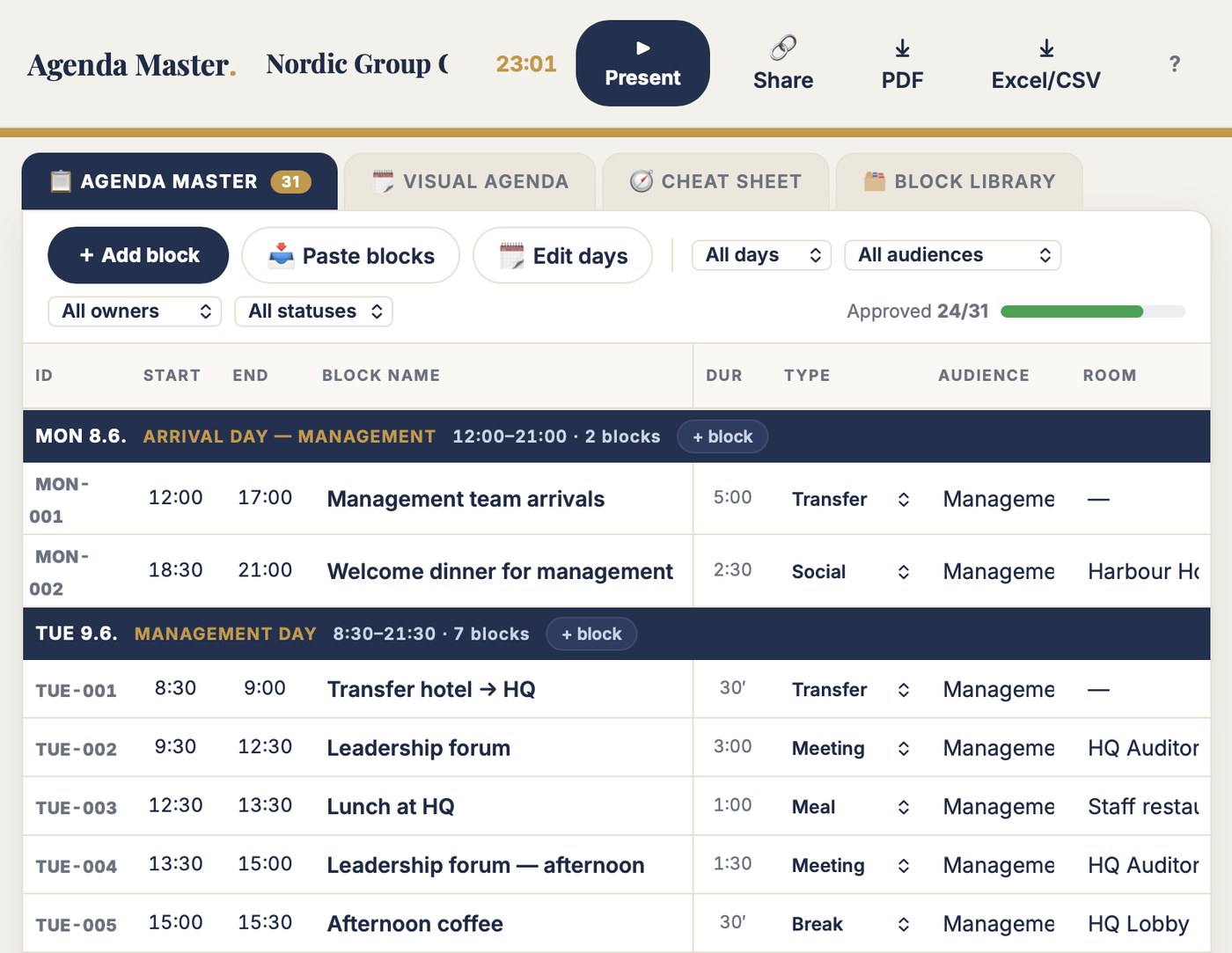
Enter each block once: time, room, audience, owner, status. Agenda Master draws the rest — the visual day grid your client reads, and the executive cheat sheet that explains every block. Move a session once. Every view follows. Nothing is copied anywhere, ever.
You send the client a link, not an attachment. It is always the current agenda. That is the whole product.
Edit the master table; the visual agenda and the cheat sheet redraw from it live. There is no second copy to forget and no overview grid to redraw at midnight. Move one session — every view follows.
Two blocks in one room at one time turn red the instant it happens. Type "14;00" with a semicolon and it still reads 14:00 — in a spreadsheet that goes in as text, the sort breaks quietly, and the printout goes out anyway.
Every block is Draft, In review, Approved or Cancelled. One bar shows how much the client has signed off. The cheat sheet shows what leadership still owes before the steering call — filter to it and print exactly that.
The free test is the full tool on a real example: a five-day group conference, 31 agenda blocks, parallel sessions and a filled-in executive cheat sheet. Move a session and watch the visual agenda redraw itself. Type "14;00" and watch it behave.
No account. No email. Nothing saves. Two minutes tells you more than this page can.
| The job | Your spreadsheet | Agenda Master |
|---|---|---|
| Keeping the views in sync | A master schedule, an overview grid and an event-app template — the same agenda typed three times. Move one session, redraw the grid by hand. | One master table. The visual agenda and the cheat sheet draw from it live. |
| A time like "14;00" | Filed as text with a semicolon. The sort breaks quietly and the printout goes out anyway. | Read as 14:00, written clean, sorted right — every time. |
| The date in every row | =$C$9. Delete row 9 and Wednesday becomes #REF! on all forty rows at once. | The day is the day. There is no cell to point at, so nothing to break. |
| Moving a parallel session | Un-merge, re-merge across three columns, and pray. Fifteen minutes for a 30-minute change. | Change the time. The visual view redraws the lanes automatically — no merged cells involved. |
| The executive brief | A fourth document, updated last week, maybe. Nobody's sure it matches the schedule. | A cheat sheet drawn from the same table: purpose, key message, what leadership still owes. |
| The client's copy | An email attachment — one version behind the moment you press send. | A view-only link into the visual grid. Always the current agenda. They change nothing. |
| Which version is approved | "The Wednesday" — approval lives in an email thread and the file is Kopio_…_v07042026.xlsx. | Approval status per block, on the block. No email archaeology. |
These are not invented examples. They are lines from agendas that ran world championships and corporate conferences. The logic in them was right the whole time — times, rooms, audiences, owners, status. The copies were the problem. Agenda Master keeps the logic and deletes the copies.
Agenda Master is for the producer whose agenda is a document other people read and approve — a client, a board, a room full of executives — and who gets asked "is this the latest one?" in every meeting.
The Agenda Master table is the planner's home: one row per block, with start, end, type, audience, room, owner, status and an update note. Block IDs assign themselves — WED-001, WED-002 — and rows sort by time.
The Visual Agenda is the client's view: days as columns, time down the side, every block coloured by type, parallel sessions side by side. The Cheat Sheet is the executives': one card per block with its purpose, key message and the input leadership still owes.
| ID | Start | End | Block | Room | Owner | Status |
|---|---|---|---|---|---|---|
| WED 10.6. · CONFERENCE DAY 1 8:00–22:00 · 11 BLOCKS | ||||||
| WED-002 | 8:30 | 9:30 | Opening session | Grand Hall | Client | In review |
| WED-003 | 9:30 | 10:30 | Coffee & icebreaker workshops | Garden Hall | Event team | Approved |
| WED-004 | 10:30 | 12:00 | Business unit sessions — round 1 | Breakouts 1–7 | Team leads | Approved |
| WED-005 | 12:00 | 13:00 | Conference lunch | Garden Hall ⚠ | Event team | Approved |
| WED-009 | 18:30 | 19:30 | Evening concert — live orchestra | Grand Hall | Event team | Approved |
Full-screen view for agenda meetings and event-day lobby screens: one day at a time, large type, live clock, the current block highlighted as it happens. Nobody reads a spreadsheet off a wall. This they read.
Between meetings, 🔗 Share makes two view-only links — the full planning table for co-organisers, the visual day grid for the client. The whole agenda travels inside the link. No account needed, nothing to install.
One agenda sent to a client in the wrong version costs a correction email and a little trust. One parallel session redrawn by hand costs an evening. This costs less than either. Test first — buy when it earns its place.
Pairs with Rundown Master: Agenda Master sells the event to the client, Rundown Master runs the show minute by minute. Six tools in the toolbox — any three for €199.
You can. I did, for ten years — a master schedule, an overview grid, a cheat sheet, all the same days. The logic was right the whole time; what broke was keeping three copies in sync. If your sheets never fall out of step, keep them. This is for everyone else.
No. Agenda Master runs in the browser — laptop, tablet or phone. Your events save automatically to your account.
No, and on purpose. The agenda answers what happens, when, where and for whom — the version you show clients and executives. Cues, supplier tasks and stage calls belong in Rundown Master. Agenda Master stays clean enough to send to a CEO.
No — and that's the feature. The client gets a view-only link that opens straight into the visual day grid. They see the current agenda, always; they change nothing. Approvals happen per block in your master table, where you can point at them.
No — it feeds it. The CSV export carries date, start, end, session title, room and description in clean columns, so filling the event-app template stops being a third manual copy of your agenda.
The full tool on an example event — five days, 31 blocks, parallel sessions, a filled-in cheat sheet. Move a session and watch the visual agenda redraw itself. Nothing saves — 100 people can test at once and never see each other's changes.
Two minutes in the demo tells you more than this page can.